An AI assistant that helps people find their way around a company — ask a question instead of digging through folders, documents and chats.
Role
Product designer — information architecture, UX/UI, tone of voice, conversation design and classifier guidelines
Team
Project lead, AI engineer, product designer
Scope
Concept for a 2–3 week proof of concept: conversation design, classifier guidelines, public and employee modes
Status
Concept
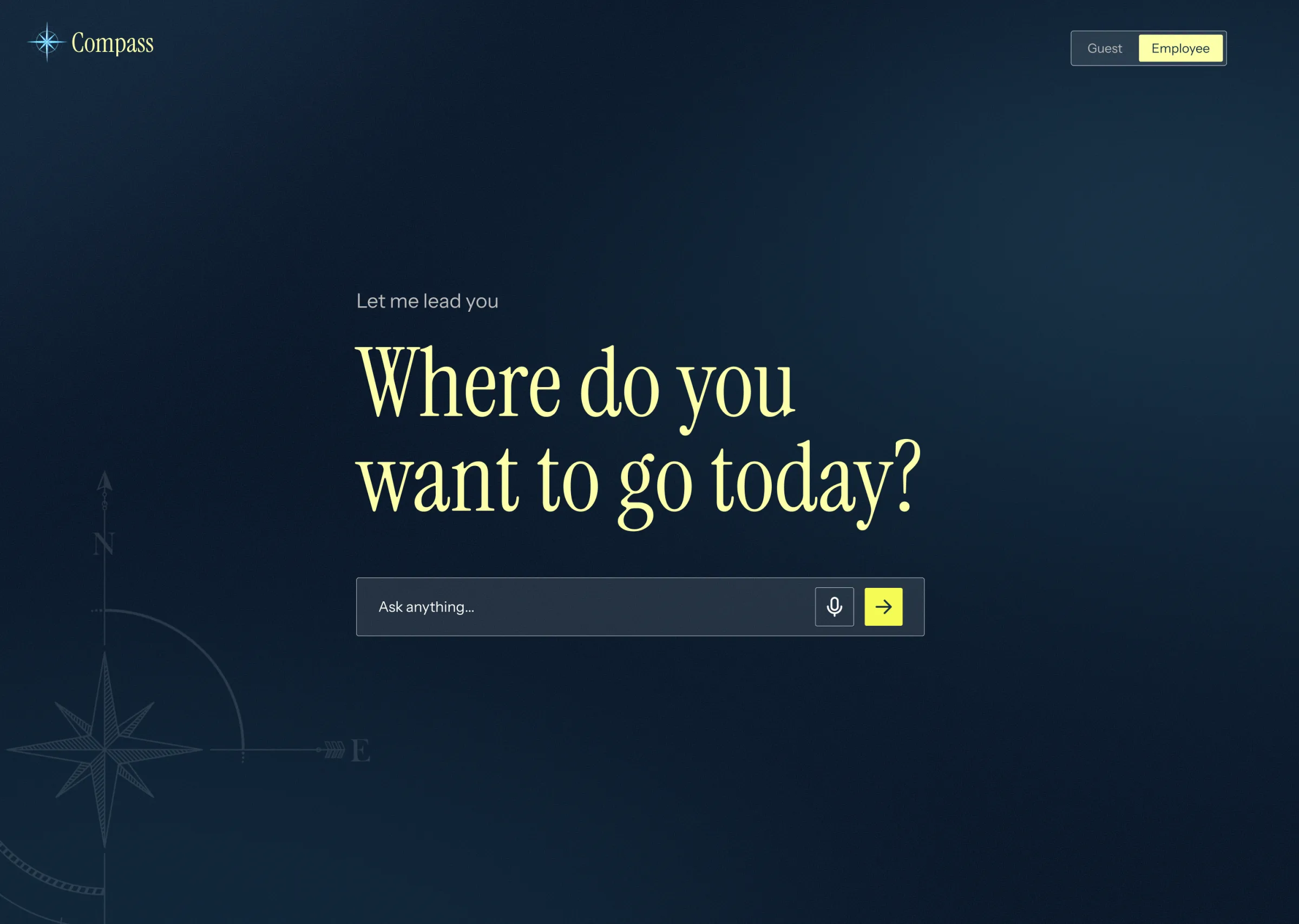
(open full size)Empty state. One question instead of a menu — guests and employees see different starting points.
Context
Company knowledge lives everywhere: policy documents, HR systems, org charts, the website, press releases — and people's heads. Finding a simple answer usually means knowing where to look first.
Knowledge is scattered. Policies, procedures, contacts and public materials live in different tools.
Navigation is the bottleneck. To find something, you first need to know where it lives — and who owns it.
Content goes stale. Static pages depend on departments that are busy doing their actual jobs.
The idea: ask, don't navigate
Instead of menus, people ask in plain language — by text or voice. Compass finds the answer, points to the right document or tool, or connects them with the person who knows.
Two audiences, one assistant
Public mode
For clients, candidates and anyone outside the company. Compass answers only from public sources: the website, press releases and social media.
Employee mode
After signing in, people also get internal policies, procedures, tools and contacts.
The same question can get a different answer depending on who's asking — so access was part of the design from day one, not a filter added at the end.
Company-wide answers first
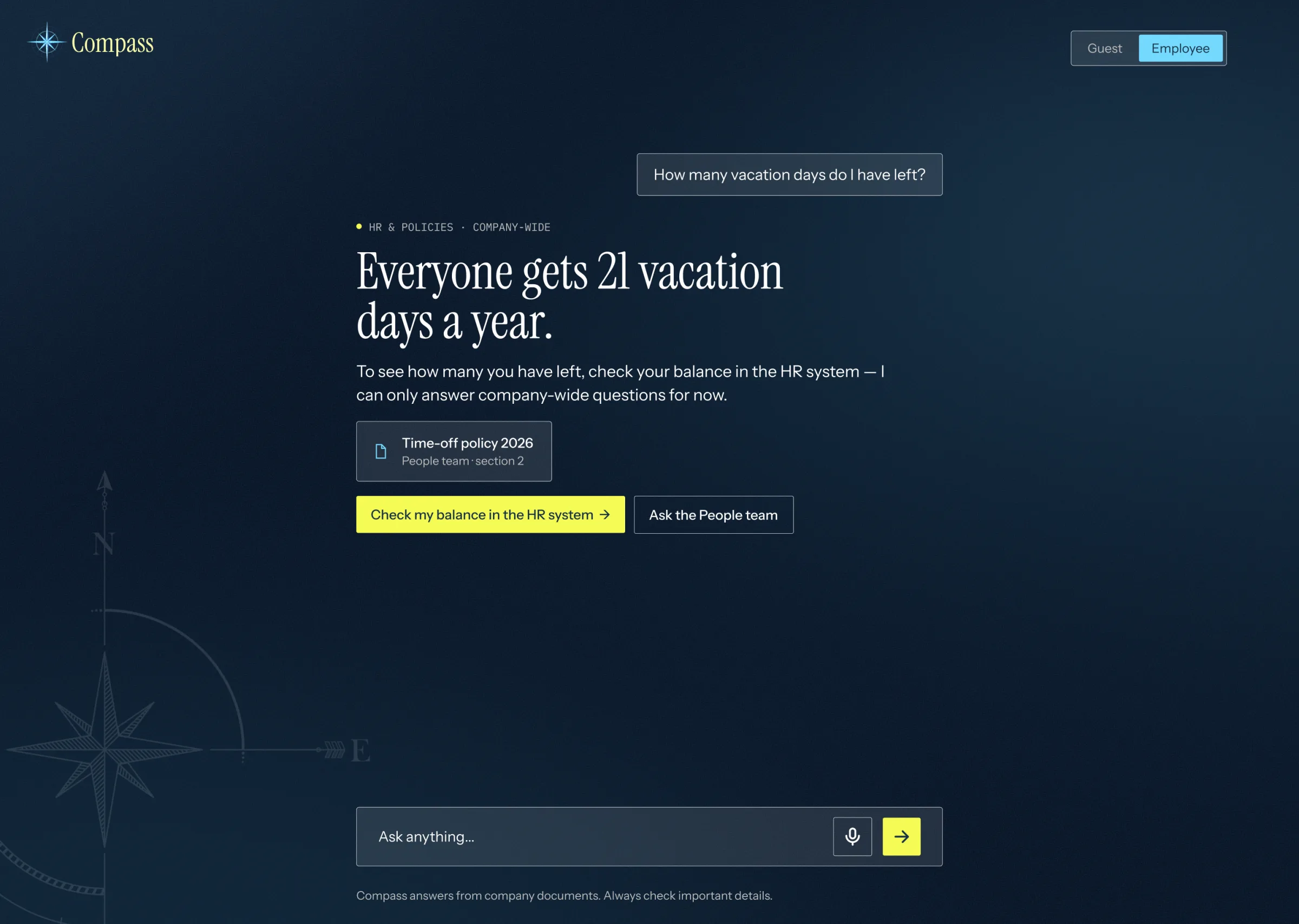
The first version answers company-wide questions, not personal ones. Ask "How many vacation days do I have left?" and Compass gives the policy and shows where to find your own balance:
"Everyone gets 21 vacation days a year. To see how many you have left, check your balance in the HR system."
Personal answers need deep access to people's data — so they come later, once the basics are trusted.
(open full size)Version 1. Company-wide answer, the source it came from and where to check your own data.
How it works
Diagram: a message goes to a fast classifier that checks topic, privacy and tone, then takes one of three paths.
Message
Fast classifiertopic · privacy · tone
Known answerLink, document or the right person
Needs a written answerA large language model generates it
Risky or unclearClarify, decline politely or hand over to a person
Most questions don't need a big, expensive model. A fast, low-cost classifier triages every message first and calls a large language model only when a generated answer is really needed. That keeps answers fast and costs predictable.
Classifier guidelines
A classifier is only as good as the questions it's asked. I wrote guidelines that turn product decisions into checks the model can run — and paired every possible outcome with what Compass says back. The checks are the logic; the replies are conversation design.
Core principle: one check = one simple decision.
Every check uses one of three formats:
Choice
Pick one category from a list
Score
A value on a scale, like low / medium / high
Yes / no
A single question with two answers
A checklist for developers
To turn any new use case into a check:
What are we analyzing? Usually the user's message.
What do we need to know? Topic, urgency, tone, desired action.
Which format fits? A category → Choice. A scale → Score. A yes/no question → Yes / no.
Describe the options clearly. Categories shouldn't overlap. Add an "other" option when unknown cases are possible.
Plan for uncertainty. If confidence is low, ask the user to clarify or hand the decision to a person.
Key decisions
Topic: the right source for every question
Problem
"How many vacation days do I have?" and "What's the capital of Spain?" need completely different sources.
Solution
A Choice check routes every question before answering:
Topic routes
Topic
What happens
HR & policies
Answer from HR and policy data
People & teams
Answer from the org chart and directory
General knowledge
Answered like a normal AI assistant, no company data needed
Unclear
"I'm not sure I understood that — could you rephrase?"
Classifier check
{"topic":{"type":"choice","instructions":"What is this question mainly about?","criteria":{"hr_policy":"Vacation, sick leave, benefits, company policies","org_info":"Who works where, who reports to whom, team structure","general_knowledge":"Facts about the world, unrelated to the company","unclear":"The question is unclear or does not fit the other categories"}}}
Someone else's private data
Problem
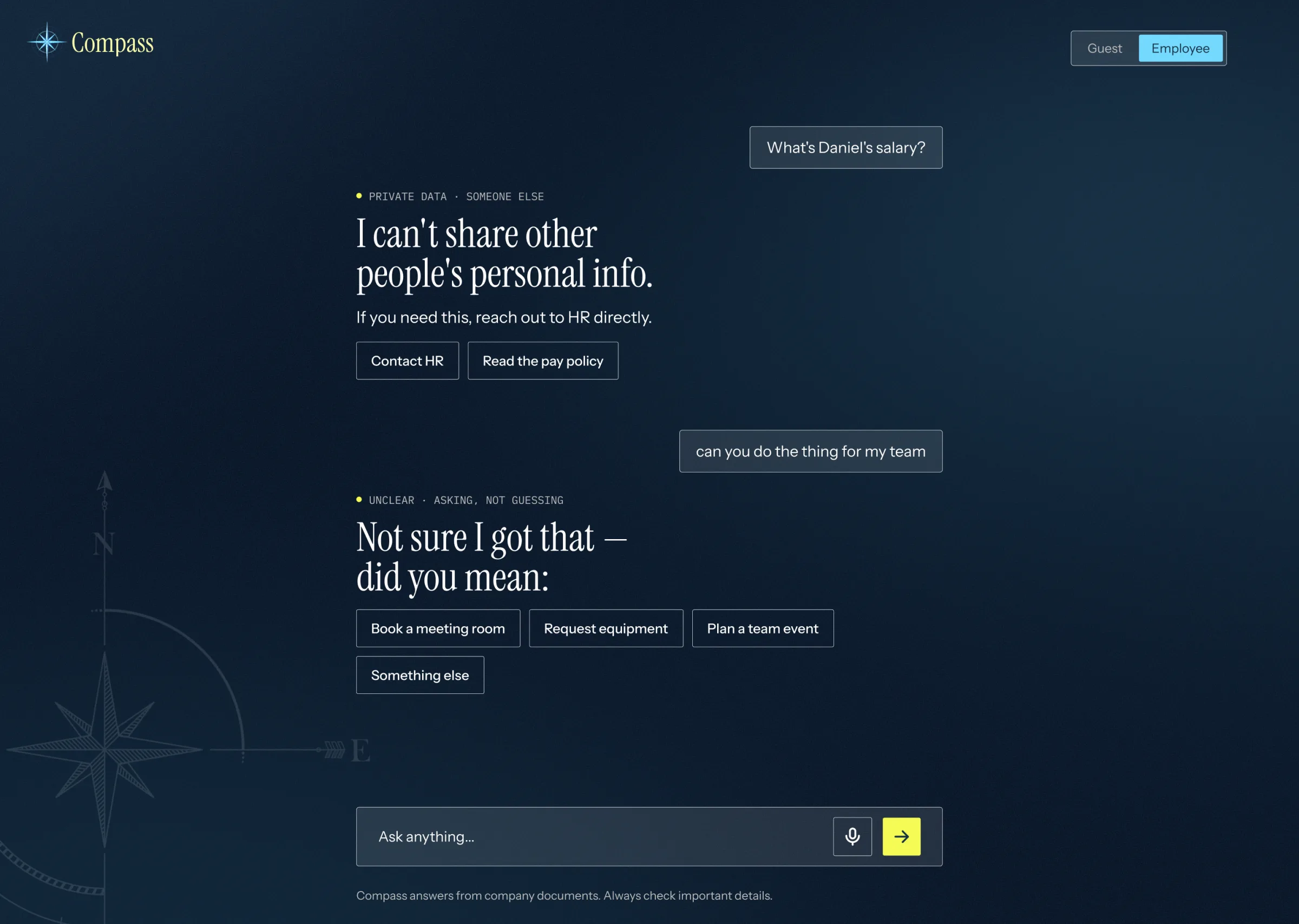
"What's Daniel's salary?" Compass can see sensitive data — it must never share another employee's salary, sick leave, performance or personal details.
Solution
A Yes / no check separates the user's own data from someone else's. Your own data → the general rule and where to find your details. Someone else's → a clear, friendly no and a pointer to the right place:
"I can't share other people's personal info. If you need this, reach out to HR directly."
Classifier check
{"asks_about_others_private_data":{"type":"yes/no","instructions":"Does this question ask about another specific employee's private information, such as salary, sick leave, performance, or personal details?","criteria":{"yes":"Names or clearly refers to a specific other employee's private data","no":"Asks about the user's own data, or is not about private data at all"}}}
(open full size)Boundaries. A friendly no for someone else's data, and a clarifying question instead of a guess.
Toxic content: a boundary, not a lecture
Problem
Hateful or offensive messages shouldn't get a straight answer — but a lecture doesn't help either.
Solution
A Choice check names the type of content, and Compass replies with short, human lines that set a boundary and invite a new question:
Replies to toxic messages
Category
What Compass says
Racism
"Whoa, not here 👋 Compass is for work stuff, not this. Try again with something nicer?"
Misogyny
"That's not the vibe here. Let's keep it respectful — ask me something else!"
Xenophobia
"Not going there. This is a friendly space for everyone at the company."
Other
"Let's keep it friendly here 🙂 Try rephrasing that."
One of the questions I brought to the team: does each category need its own reply, or is one shared "not here" reply safer for the first version?
Designing for uncertainty
A model is never 100% sure. What the assistant does when it isn't is a design decision, not a technical detail.
Ask, don't guess. Low confidence → a clarifying question or a handover to a person, never a confident wrong answer.
A higher bar for risky checks. Getting a topic slightly wrong costs a second question. Getting privacy wrong costs trust. So the privacy check should need more confidence than topic routing.
When two checks fire at once. A message can be both offensive and about someone else's salary. The guidelines define this as a priority question — which reply wins — instead of leaving it to chance.
Tone of voice
Friendly, short and never preachy — like a colleague who knows where everything is. Compass says no without making people feel judged, and always offers a next step.
Try it
Pick a message and see how Compass reads it — which checks fire, which path it takes and what it says back.
Example messages
CompassEmployee mode
Pick a message to start.
Illustrative demo — replies are scripted to show the design, not a live model.
What's next
The concept was scoped as a short proof of concept. The next steps:
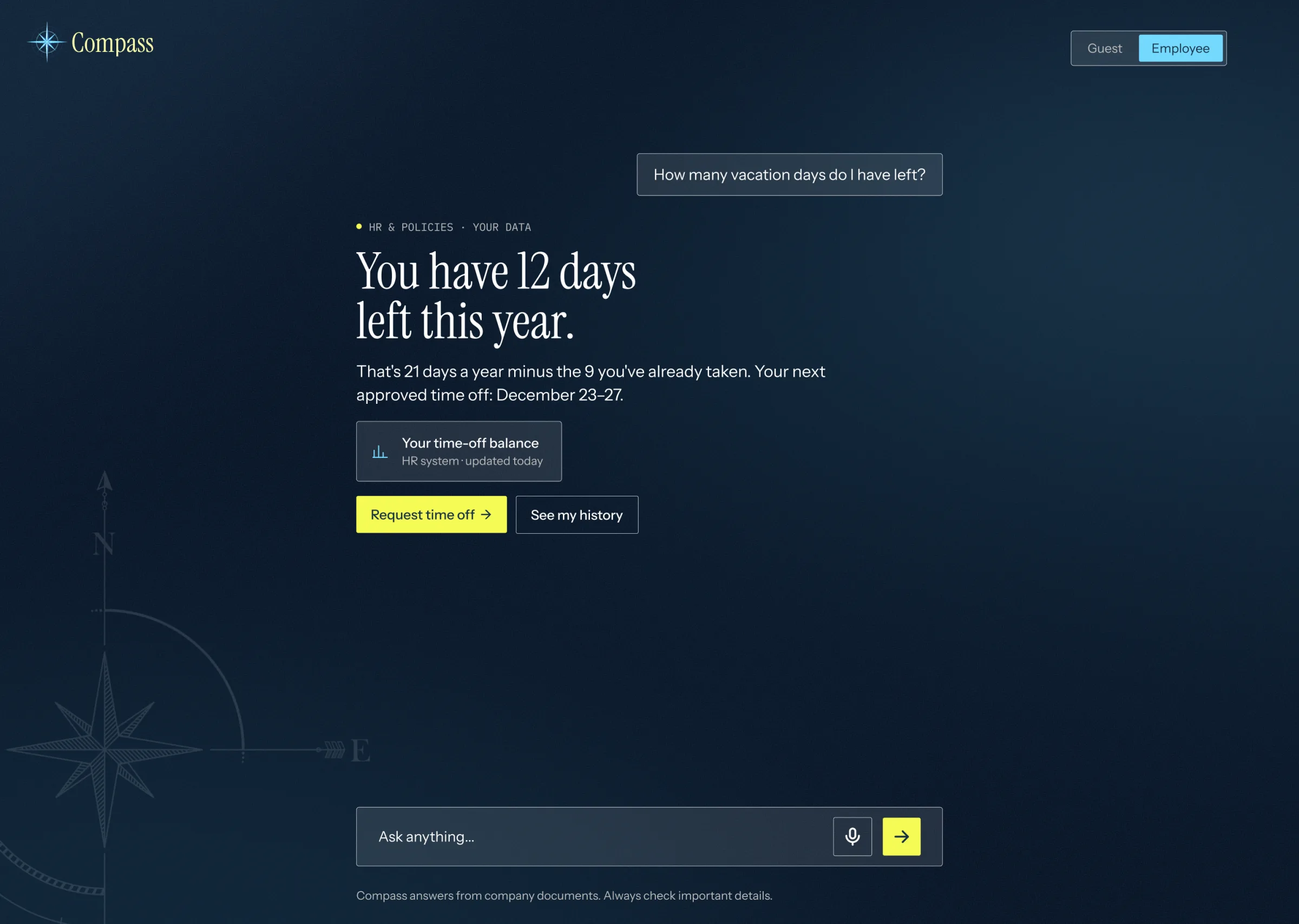
Personalization — connect Compass to HR and other systems so it can answer "How many vacation days do I have left?" with your own numbers, not just the company rule.
(open full size)Next step. Personal answers once Compass is connected to HR systems.
Thresholds — what confidence level each check needs before Compass acts on it.
Priorities — which reply wins when several checks fire at once.
Granularity — one reply per category, or one shared reply for v1.
New topics — IT, equipment, finance and more, as real questions come in.
What I learned
Conversation design is product design. Every question people ask reflects a real need behind it — and a good assistant has to anticipate them. AI products are full of product design work: deciding what the assistant understands, what it says and when it steps back.
Protecting the company is part of the job. Any reply can be screenshotted and shared online. One careless answer to an inappropriate request can hurt the reputation of the whole company, so every edge case has to be planned for. It's a big responsibility — and one I take seriously.
Compass is a concept. Company details and data are anonymized.